

- Starter: $39 a month or $390 a year. 1,000 AI replies a month, 50 knowledge sources, 3 team seats, 1 AI agent and up to 20 automations. It includes the website chat widget, Shopify storefront chat and WhatsApp, product search for Shopify stores, every automation template and the builder, tickets, and leads and contacts.
- Pro: $99 a month or $990 a year. 5,000 AI replies a month, 500 knowledge sources, 11 team seats, 1 AI agent and up to 20 automations, with everything on. On top of Starter, Pro adds the email channel (the AI replies to customer emails), live chat handoff to your team, messages outside the chat (cart recovery, CSAT surveys, follow-ups by email or WhatsApp), and WhatsApp broadcast campaigns with the AI template writer, and API keys with the MCP server, which connect Claude, ChatGPT and other AI agents to your workspace. Replying to tickets by email works on both plans.
Which plan to choose
- Choose Starter if the AI answers your customers in chat and on WhatsApp, and your team follows up through tickets.
- Choose Pro if your team takes over chats live, you answer customer emails in ZynfoAI, you send messages outside the chat or WhatsApp campaigns, or you need more replies, sources or seats.
Buy a plan
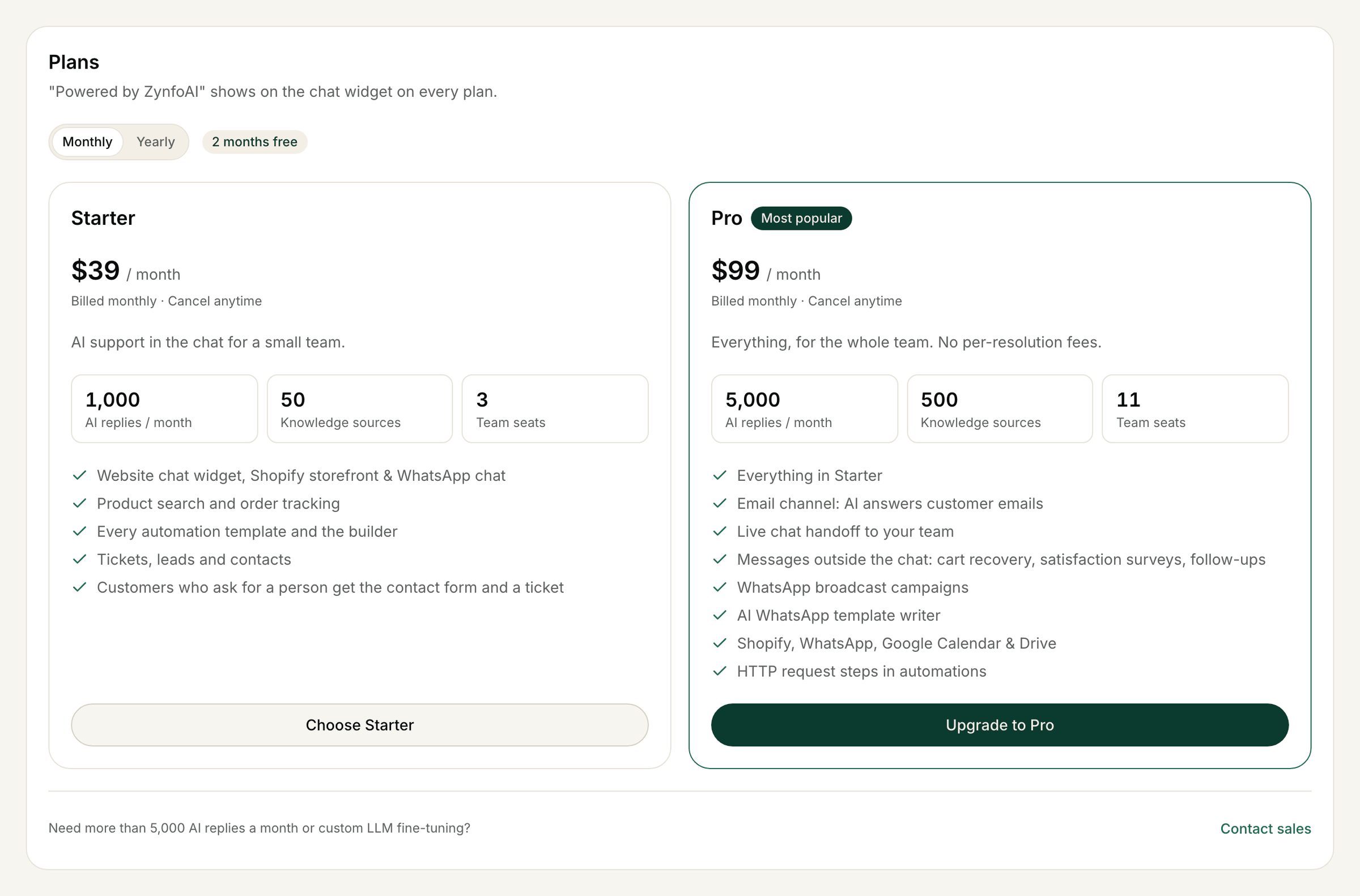
The Plans section on the Free plan, with sample data.
1
Start checkout
Under Plans, pick Monthly or Yearly if both are shown, then click Choose Starter
or Upgrade to Pro. (The button at the top of the page, Choose a plan, takes you there.)
You go to a secure checkout page run by our payment provider, Dodo Payments.
2
Pay
Complete the checkout. If you upgrade during the trial, you keep the trial days you have left and
the first charge is when the trial ends. Your sign-up trial was your free trial, so checkout doesn’t
add another one.
3
Back in ZynfoAI
You return to Billing & Usage, where a Payment successful message confirms the plan. It can
take a few seconds. If you closed the checkout, nothing is charged and you can try again.
Yearly billing ($390 a year for Starter, $990 a year for Pro) shows on the billing page when it’s
offered. To switch a plan you already have between monthly and yearly, email
support@zynfo.ai.
Upgrade or downgrade
To move from Starter to Pro, or from Pro to Starter, go to Settings → Billing & Usage and click Upgrade to Pro or Switch to Starter. The change happens straight away on the same billing cycle, and Dodo Payments prorates the charge. Moving to Starter asks you to confirm with Switch to Starter (or Stay on Pro). The Pro-only features then stop: the email channel stops answering customer emails (your email settings are kept for when you move back to Pro), customers who ask for a person get the contact form and a ticket instead of live chat, messages outside the chat stop, and WhatsApp campaigns and templates can’t be created or sent. A scheduled campaign is paused, not sent. WhatsApp chat keeps working.Check your plan and usage
The Current plan & usage card shows your plan, its status, the rate, when it renews, how you pay, and this month’s AI replies this month and Knowledge updates against your limits. Click Manage billing at the top of the page to update your card or billing details.Download invoices
Invoices & receipts lists your payments. Click Download PDF for an invoice.Cancel
- Click Cancel subscription at the top of the page.
- In Cancel your subscription?, confirm with Cancel subscription. Keep subscription closes the message and changes nothing.
Refunds
Starter and Pro have a 15-day money-back guarantee. To ask for a refund, email support@zynfo.ai within 15 days of the charge. See the refund and cancellation policy.When the trial or plan ends
When your trial ends without a paid plan, or a cancelled plan reaches the end of its paid period, the workspace moves to the Free plan:- The AI agent keeps answering customers from your knowledge base, up to 100 AI replies a month, with up to 15 knowledge sources. Product search and other ecommerce and automation features are off.
- The dashboard is read-only. Any change opens Your trial has ended; click Upgrade to choose a plan. Billing, exporting data and deleting the workspace still work.
- Your chats, tickets, leads and knowledge are kept.
If you use ZynfoAI through the Shopify app
If your workspace was created by the ZynfoAI app in Shopify, your plan is billed by Shopify and appears on your Shopify invoice. The billing page shows Manage in Shopify: upgrade, change or cancel your plan in the ZynfoAI app inside your Shopify admin (Settings → Plan & billing). When you cancel there, the plan ends straight away, Shopify credits the unused part of the period, and the store moves to Free. You can’t use the ZynfoAI checkout for a store billed by Shopify. See ZynfoAI for Shopify. If you link a Shopify store to a workspace you made on zynfo.ai:- You already pay on zynfo.ai: you keep paying there. The Shopify app doesn’t charge you again.
- You don’t have a paid plan: the workspace is on Free. If you upgrade to Pro in the Shopify app, billing moves to Shopify and your zynfo.ai subscription, if any, is cancelled, so you never pay twice.